📱 MOBIKO PWA – How Is the MOBIKO App Structured and What Do the Sections Mean?
🏠 Home Screen of the MOBIKO App – What Do the Different Sections Mean?
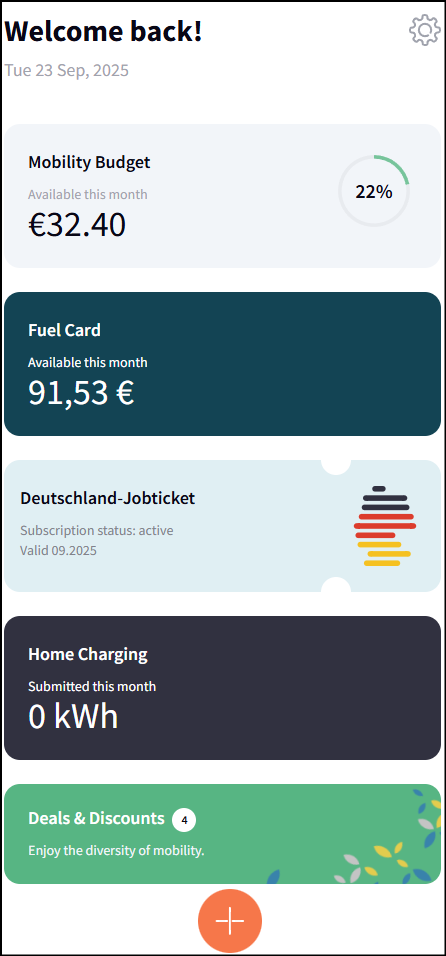
When you log in to the MOBIKO app (PWA), the home screen gives you an overview of your current mobility benefits. Here’s what each section means:
💸 Mobility Budget
Shows the amount you still have available for the current month.
The circle next to it shows, in percent, how much of your budget you’ve already used.
⛽ Fuel Card
If your employer provides you with a digital fuel card, this section displays the available balance for the current month.
🚆 Germany Job Ticket
If you receive a Deutschlandticket via your employer, you’ll find your subscription status and validity period here.
🔌 Home Charging
This section shows how many kilowatt-hours (kWh) you’ve already submitted this month for charging your electric vehicle at home.
🎁 Deals & Discounts
Find exclusive deals and discounts related to mobility – such as bike leasing, sharing services, or wallbox purchases.
✅ Tip:
Clicking on the individual cards often reveals more information or takes you straight to the appropriate submission form.
📸 Sample screenshot: